Introduction
Mocking technique is very useful for testing purpose. Moq is a third party framework that enables us to create the dummy class and dummy implementation. This is very useful in the scenarios where we want to test the functionality of a class without implementing the other classes and their methods. Moq 是一个 C# 的 Mock 框架,主要用于单元测试中“模拟对象”。
- 目的:让你可以测试某个类或方法,而不依赖它的真实外部依赖(数据库、API、文件系统等)。
- 核心思想:用“假对象”替代真实对象,控制行为、返回值,并验证调用。
简单理解:如果你有一个类依赖数据库,你不想每次跑测试都连数据库,就用 Moq 模拟这个依赖。
在进行单元测试(Unit Testing)时,我们希望隔离被测试的组件(称为系统或单元 SUT - System Under Test),以便只测试它本身的逻辑,而不受其依赖项(如数据库、外部服务、文件系统等)的影响。 Moq 允许您创建模拟对象(Mock Objects),这些对象可以模仿(Mimic)真实依赖项的行为,从而:
- 隔离测试: 确保测试失败是由 SUT 本身的错误引起,而不是由其依赖项的问题引起。
- 控制行为: 为依赖项设置特定的返回值或行为,以测试 SUT 在不同场景(如成功、失败、异常)下的表现。
- 验证交互: 检查 SUT 是否与依赖项进行了预期的交互(例如,是否调用了某个方法,以及调用的参数是否正确)。
Moq 充分利用了 C# 的 Lambda 表达式和 强类型特性,提供了简洁、类型安全且易于重构的 API。Installation
-
nuget > Moq > install
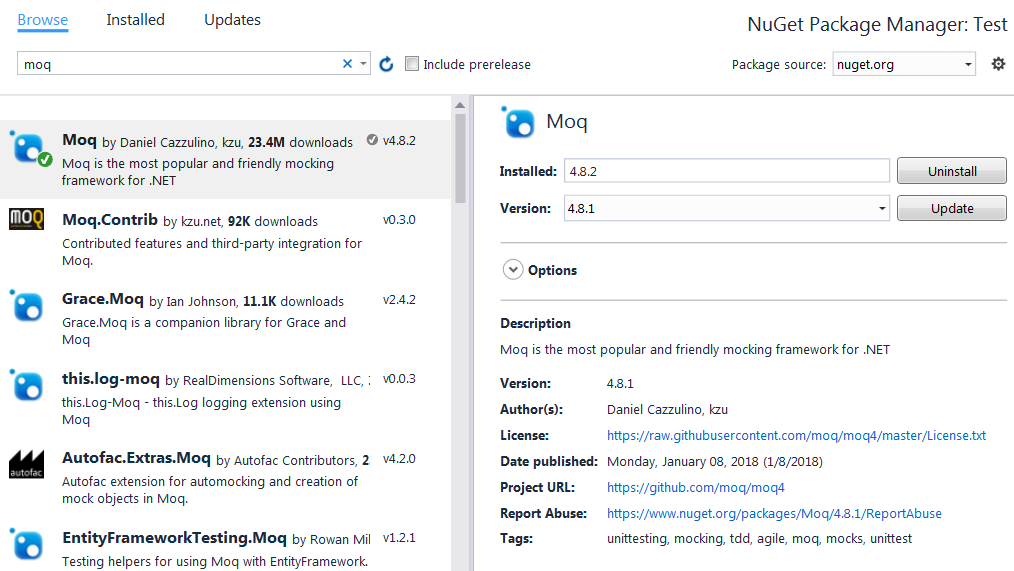
Install-Package MoqSteps
Arrange (设置环境)
创建 Mock 对象:
使用
Mock<T>类创建您想要模拟的接口或类的实例。T 通常是您的 SUT 所依赖的接口。var mockObj = new Mock<MockClass>() var mockService = new Mock<IService>();设置行为 (Setup):
定义当SUT调用模拟对象上的特定方法时,它应该如何响应(返回什么值、抛出什么异常等)。 2种主要方法: specific value
// set up the mock by specifying argument values
mockObj.Setup(x => x.method(param1, ...)).Returns(xxx)
// 设置 IService 的 GetData() 方法被调用时,返回 "Mock Data"
mockService.Setup(s => s.GetData()).Returns("Mock Data");
Moq’s argument matching technique
// specify the param of the mock should be a certain data type
mockObj.Setup(x => x.method(It.IsAny<Param1DataType>(), ...)).Returns(xxx)

// specify the param of the mock must meet some conditions
mockObj.Setup(x => x.IsValid(It.Is<Param1DataType>(param1 => param1..condition...)).Returns(xxx)

// specify the param of the mock must be within a set
mockObj.Setup(x => x.IsValid(It.IsIn("xx", "yy", "zz"))).Returns(xxx)

// specify the param of the mock must be within a range
mockObj.Setup(x => x.IsValid(It.IsInRange("xx", "yy", "zz", Range.Inclusive))).Returns(xxx)

// specify the param of the mock must meet a regex
mockObj.Setup(x => x.IsValid(It.IsRegex("[xx|yy|zz]", RegexOptions.None))).Returns(xxx)

// 设置 IService 的 Add(int a, int b) 方法被调用时,返回两数之和
mockService.Setup(s => s.Add(It.IsAny<int>(), It.IsAny<int>()))
           .Returns((int a, int b) => a + b);
Setup: 用于定义期望。
Returns: 定义方法的返回值。
It.IsAny<T>(): 匹配任何 T 类型的参数。Moq 提供了多种参数匹配器,如 It.Is<T>(predicate)(满足某个条件的参数)等。
获取 Mocked 实例:
通过 Object 属性获取实际的模拟实例,并将其注入到您的 SUT 中。
Inject the mock object via constructor or method parameter to business logic. Then, make the test
var result = BusinessServiceClassInstance.get(mockObj.Object);
Assert.IsTrue(result);

mockObj.Verify(m => m.Method1(It.isAny<ParamDataType>()), Times.Once);
mockObj.Verify(m => m.Method2(It.isAny<ParamDataType>()), Times.Exactly(2));

// 获取模拟实例,作为 SUT 的依赖项
IService service = mockService.Object;
var sut = new MySystemUnderTest(service);
Act (执行操作)
执行 SUT 中您想要测试的方法。
// 调用 SUT 中依赖于 IService 的方法
var result = sut.ProcessData();
Assert (断言/验证)
断言结果: 检查 SUT 返回的值是否符合预期。
Assert.AreEqual("Processed Mock Data", result);
验证交互 (Verify): 检查 SUT 是否与模拟对象进行了预期的交互(这是一个 Mock 框架特有的步骤,通常用于测试 SUT 的副作用或协作行为)。
// 验证 IService 的 GetData() 方法是否被调用了恰好一次
mockService.Verify(s => s.GetData(), Times.Once());

// 验证 IService 的 Save() 方法是否没有被调用
mockService.Verify(s => s.Save(), Times.Never());
Verify: 用于验证方法调用。 Times: 定义调用次数的约束,如 Once()、Never()、AtLeastOnce() 等。
Demo 1 - Make uniting testing with mock via AAA principle
create a service project and a unit test project
In service project > Develop some service logic
public interface IMailClient
{
	string Server { get; set; }
	string Port { get; set; }

	bool SendMail(string from, string to, string subject, string body);
}

public interface IMailer
{
	string From { get; set; }
	string To { get; set; }
	string Subject { get; set; }
	string Body { get; set; }

	bool SendMail(IMailClient mailClient);
}

// logic
public class DefaultMailer : IMailer
{
	public string From { get; set; }
	public string To { get; set; }
	public string Subject { get; set; }
	public string Body { get; set; }

	public bool SendMail(IMailClient mailClient)
	{
		return mailClient.SendMail(this.From, this.To, this.Subject, this.Body);
	}
}
We defined two interfaces and interfaces is okay to mock. Moq will create mocks to make default implementation for us.
In unit test project
Create a unit test class
Arrange - Create a mock object. Pass the mock to the logic
// create mock object
var mockMailClient = new Mock<IMailClient>();
// setup the mock object, here we setup the SendMail() method
mockMailClient.Setup(client =>
		client.SendMail(It.IsAny<string>(), It.IsAny<string>(), It.IsAny<string>(), It.IsAny<string>())
		);
// create mock data
var mailer = new DefaultMailer() { From = "from@mail.com", To = "to@mail.com", Subject = "Using Moq", Body = "Moq is awesome" };
Act- Execute the logic with mock
// use mock to send email
mailer.SendMail(mockMailClient.Object);
Assert - Verify the system interaction
// we expect client.SendMail() method is called at least once
mockMailClient.Verify(client => client.SendMail(It.IsAny<string>(), It.IsAny<string>(), It.IsAny<string>(), It.IsAny<string>()), Times.AtLeastOnce);
The complete unit test code
[TestClass]
public class MoqTest
{
	[TestMethod]
	public void SendEmail_ShouldSucceed()
	{
		// create mock
		var mockMailClient = new Mock<IMailClient>();
		mockMailClient
			.SetupProperty(client => client.Server, "server.mail.com")
			.SetupProperty(client => client.Port, "1000");
		// set up mock
		mockMailClient.Setup(client =>
			client.SendMail(It.IsAny<string>(), It.IsAny<string>(), It.IsAny<string>(), It.IsAny<string>())
			)
			.Callback(new Action<string, string, string, string>((a, b, c, d) =>
			{
				System.Console.WriteLine($"from: {a} -> to: {b}, subject: {c}, body: {d}");
			}))
			.Returns(true);
		// create mock data
		var mailer = new DefaultMailer() { From = "from@mail.com", To = "to@mail.com", Subject = "Using Moq", Body = "Moq is awesome" };
		// use mock to send email
		var result = mailer.SendMail(mockMailClient.Object);
		// verify result
		mockMailClient.Verify(client => client.SendMail(It.IsAny<string>(), It.IsAny<string>(), It.IsAny<string>(), It.IsAny<string>()), Times.AtLeastOnce);
		System.Console.WriteLine($"sent result: {result}");
	}
}
Demo 2 - make unit testing for entity framework based logic
-
Create entity framework basic entities and dbcontext
 public class BloggingContext : DbContext
 {
     public virtual DbSet<Blog> Blogs { get; set; } // property must be virtual so that moq can create proxy
     public virtual DbSet<Post> Posts { get; set; } // property must be virtual so that moq can create proxy
 }

 public class Blog
 {
     public int BlogId { get; set; }
     public string Name { get; set; }
     public string Url { get; set; }

     public virtual List<Post> Posts { get; set; }
 }

 public class Post
 {
     public int PostId { get; set; }
     public string Title { get; set; }
     public string Content { get; set; }

     public int BlogId { get; set; }
     public virtual Blog Blog { get; set; }
 }
Please note that the DbSet properties on the context are marked as virtual. This will allow the mocking framework to derive from our context and overriding these properties with a mocked implementation.
-
Create the service to be tested
public class BlogService { private BloggingContext _context; public BlogService(BloggingContext context) { _context = context; } public Blog AddBlog(string name, string url) { var blog = _context.Blogs.Add(new Blog { Name = name, Url = url }); _context.SaveChanges(); return blog; } public List<Blog> GetAllBlogs() { var query = from b in _context.Blogs orderby b.Name select b; return query.ToList(); } public async Task<List<Blog>> GetAllBlogsAsync() { var query = from b in _context.Blogs orderby b.Name select b; return await query.ToListAsync(); } } -
Create mocks and test the saving logic
// create service instance[TestClass] public class NonQueryTests { [TestMethod] public void CreateBlog_saves_a_blog_via_context() { // set up mocks var mockSet = new Mock<DbSet<Blog>>(); var mockContext = new Mock<BloggingContext>(); mockContext.Setup(m => m.Blogs).Returns(mockSet.Object);// verifyvar service = new BlogService(mockContext.Object); service.AddBlog("ADO.NET Blog", "http://blogs.msdn.com/adonet");mockSet.Verify(m => m.Add(It.IsAny<Blog>()), Times.Once()); mockContext.Verify(m => m.SaveChanges(), Times.Once()); } }Here are steps:
- uses Moq to create a mock context
- creates a mock DbSet
and wires it up to be returned from the context’s Blogs property - create a new BlogService using mock context. Then create a new blog using the AddBlog() method.
- verifies that the service added a new Blog and called SaveChanges on the context.
-
Create in-memory data and test the query logic
 [TestClass]
 public class QueryTests
 {
     [TestMethod]
     public void GetAllBlogs_orders_by_name()
     {
         var data = new List<Blog>
         {
             new Blog { Name = "BBB" },
             new Blog { Name = "ZZZ" },
             new Blog { Name = "AAA" },
         }.AsQueryable();

         var mockSet = new Mock<DbSet<Blog>>();
         mockSet.As<IQueryable<Blog>>().Setup(m => m.Provider).Returns(data.Provider);
         mockSet.As<IQueryable<Blog>>().Setup(m => m.Expression).Returns(data.Expression);
         mockSet.As<IQueryable<Blog>>().Setup(m => m.ElementType).Returns(data.ElementType);
         mockSet.As<IQueryable<Blog>>().Setup(m => m.GetEnumerator()).Returns(0 => data.GetEnumerator());

         var mockContext = new Mock<BloggingContext>();
         mockContext.Setup(c => c.Blogs).Returns(mockSet.Object);

         var service = new BlogService(mockContext.Object);
         var blogs = service.GetAllBlogs();

         Assert.AreEqual(3, blogs.Count);
         Assert.AreEqual("AAA", blogs[0].Name);
         Assert.AreEqual("BBB", blogs[1].Name);
         Assert.AreEqual("ZZZ", blogs[2].Name);
     }
 }
Here are steps:
- create some in-memory data – List
. - create a mock context and mock DBSet
then wire up the IQueryable implementation for the DbSet – they’re just delegating to the LINQ to Objects provider that works with List .
- create some in-memory data – List
-
Test the async query logic
In order to use the async methods we need to create an in-memory DbAsyncQueryProvider to process the async query.
 internal class TestDbAsyncQueryProvider<TEntity> : IDbAsyncQueryProvider
 {
     private readonly IQueryProvider _inner;

     internal TestDbAsyncQueryProvider(IQueryProvider inner)
     {
         _inner = inner;
     }

     public IQueryable CreateQuery(Expression expression)
     {
         return new TestDbAsyncEnumerable<TEntity>(expression);
     }

     public IQueryable<TElement> CreateQuery<TElement>(Expression expression)
     {
         return new TestDbAsyncEnumerable<TElement>(expression);
     }

     public object Execute(Expression expression)
     {
         return _inner.Execute(expression);
     }

     public TResult Execute<TResult>(Expression expression)
     {
         return _inner.Execute<TResult>(expression);
     }

     public Task<object> ExecuteAsync(Expression expression, CancellationToken cancellationToken)
     {
         return Task.FromResult(Execute(expression));
     }

     public Task<TResult> ExecuteAsync<TResult>(Expression expression, CancellationToken cancellationToken)
     {
         return Task.FromResult(Execute<TResult>(expression));
     }
 }

 internal class TestDbAsyncEnumerable<T> : EnumerableQuery<T>, IDbAsyncEnumerable<T>, IQueryable<T>
 {
     public TestDbAsyncEnumerable(IEnumerable<T> enumerable)
         : base(enumerable)
     { }

     public TestDbAsyncEnumerable(Expression expression)
         : base(expression)
     { }

     public IDbAsyncEnumerator<T> GetAsyncEnumerator()
     {
         return new TestDbAsyncEnumerator<T>(this.AsEnumerable().GetEnumerator());
     }

     IDbAsyncEnumerator IDbAsyncEnumerable.GetAsyncEnumerator()
     {
         return GetAsyncEnumerator();
     }

     IQueryProvider IQueryable.Provider
     {
         get { return new TestDbAsyncQueryProvider<T>(this); }
     }
 }

 internal class TestDbAsyncEnumerator<T> : IDbAsyncEnumerator<T>
 {
     private readonly IEnumerator<T> _inner;

     public TestDbAsyncEnumerator(IEnumerator<T> inner)
     {
         _inner = inner;
     }

     public void Dispose()
     {
         _inner.Dispose();
     }

     public Task<bool> MoveNextAsync(CancellationToken cancellationToken)
     {
         return Task.FromResult(_inner.MoveNext());
     }

     public T Current
     {
         get { return _inner.Current; }
     }

     object IDbAsyncEnumerator.Current
     {
         get { return Current; }
     }
 }
Then, use our Moq DbSet to test GetAllBlogsAsync() method
 [TestClass]
 public class AsyncQueryTests
 {
     [TestMethod]
     public async Task GetAllBlogsAsync_orders_by_name()
     {

         var data = new List<Blog>
         {
             new Blog { Name = "BBB" },
             new Blog { Name = "ZZZ" },
             new Blog { Name = "AAA" },
         }.AsQueryable();

         var mockSet = new Mock<DbSet<Blog>>();
         mockSet.As<IDbAsyncEnumerable<Blog>>()
             .Setup(m => m.GetAsyncEnumerator())
             .Returns(new TestDbAsyncEnumerator<Blog>(data.GetEnumerator()));

         mockSet.As<IQueryable<Blog>>()
             .Setup(m => m.Provider)
             .Returns(new TestDbAsyncQueryProvider<Blog>(data.Provider));

         mockSet.As<IQueryable<Blog>>().Setup(m => m.Expression).Returns(data.Expression);
         mockSet.As<IQueryable<Blog>>().Setup(m => m.ElementType).Returns(data.ElementType);
         mockSet.As<IQueryable<Blog>>().Setup(m => m.GetEnumerator()).Returns(data.GetEnumerator());

         var mockContext = new Mock<BloggingContext>();
         mockContext.Setup(c => c.Blogs).Returns(mockSet.Object);

         var service = new BlogService(mockContext.Object);
         var blogs = await service.GetAllBlogsAsync();

         Assert.AreEqual(3, blogs.Count);
         Assert.AreEqual("AAA", blogs[0].Name);
         Assert.AreEqual("BBB", blogs[1].Name);
         Assert.AreEqual("ZZZ", blogs[2].Name);
     }
 }
FAQ
-
loose mock vs. strict mock
By default, Moq use loose mock strategy for every mock object and it saves lines of code. If we specify a mock object as strict mode, each method of the mock object must has a corresponding Setup() method
var mockObj = new Mock<IMailClient>(MockBehavior.Strict);Generally, we prefer loose mock as strict mock might break whenever we modify the unit testing.
-
what can be mocked?
Moq and other similar mocking frameworks can only mock interfaces, abstract methods/properties (on abstract classes) or virtual methods/properties on concrete classes.
This is because Moq generates a proxy that will implement the interface or create a derived class that overrides those overrideable methods in order to intercept calls.
Mock 只针对虚方法或接口
- Moq 可以模拟:
public方法protected virtual方法- 接口方法
- 抽象方法
- 不能直接 Mock private、sealed、static 或非虚方法。
- 原因:Moq 通过 继承和虚方法重写 实现 Mock,而 private 和 sealed 方法无法被继承或重写。
Moq 不能直接 Mock sealed 类的非虚方法,如果需要 Mock 静态或私有方法,需要用 JustMock 或 Typemock Isolator。
References
Entity Framework Testing with a Mocking Framework